A Beginner's Guide to Cable Management for a Clutter-Free Desk
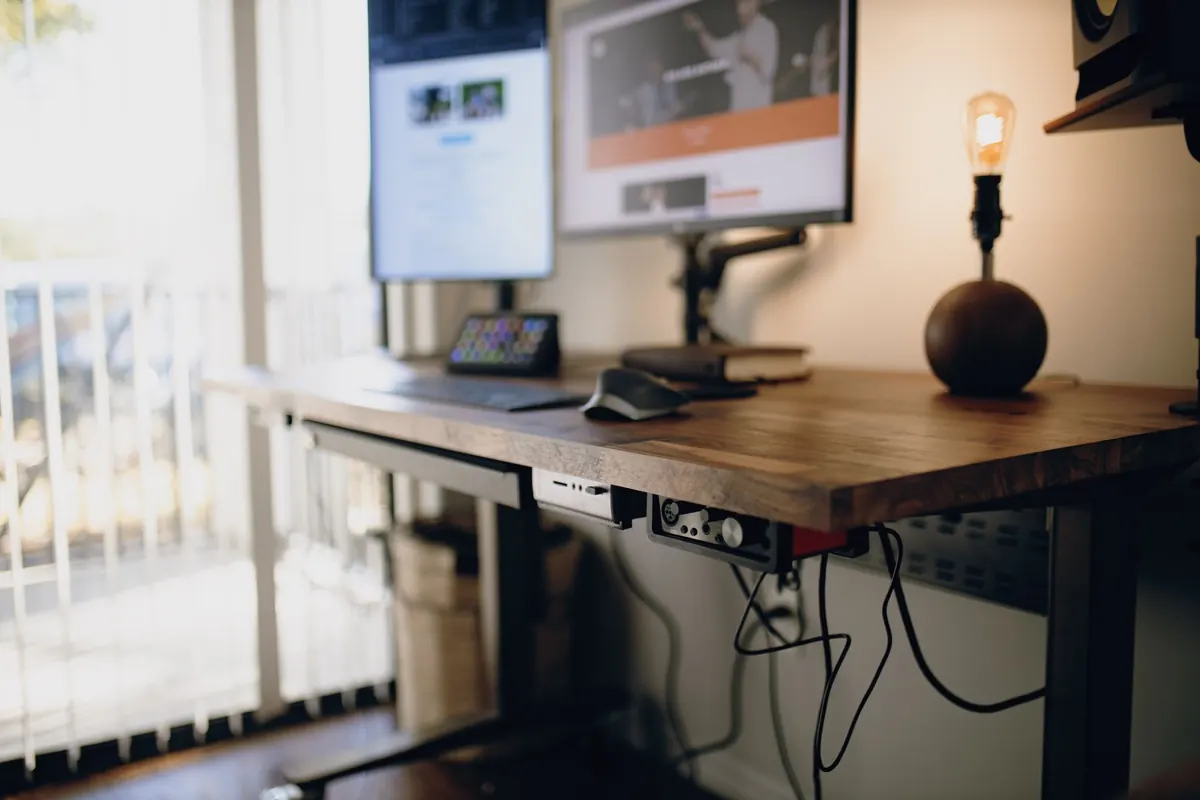
You sit down to work, and your foot finds the same tangle of cables it found yesterday. There's a laptop charger coiled around a monitor cord, a power brick balanced on the baseboard, and something under the desk that might be a USB cable or might be a spider. Cable management sounds like a project, but it's really four small tools and an hour of your time: a tray, a sleeve, a handful of adhesive clips, and a label or two. No drilling, no wall damage, no landlord conversations.
Here's how to go from nest to neat, in the order that saves you from doing it twice.
Start With a Clean Slate and a Plan
Before you buy anything, unplug everything. Yes, everything. Then sort your cables into three piles: permanent (monitor, speakers, computer, desk lamp), occasional (external drive, phone charger, headset), and travel (the charger that lives in your bag and never needs a home on the desk). Only the permanent pile gets mounted and bundled. The occasional pile gets one accessible spot — a single USB hub or a short extension you can reach without crawling on the floor.
Next, decide your two routes. Power goes down one side of the desk; data goes down the other. Keeping them apart looks cleaner and makes future troubleshooting far less annoying, because you always know which bundle to check. Plug everything in loosely first and test that each cable actually reaches where it needs to go. Most cable projects fail at this step: you mount a tray, bundle a run, and discover the monitor won't swivel.
Trays: The Backbone of a Tidy Setup
A tray gives your mess a container, and containers are what turn a bundle into something that looks intentional. Two kinds earn their place on a beginner's desk. The first is an under-desk cable tray, mounted to the underside of the desktop, which holds your power strip, power bricks, and the slack you don't want to see. The second is a slim cable raceway or channel that runs down a desk leg or wall to the floor, hiding the vertical drop.
What to look for
- Capacity with ventilation. Power bricks get warm. A tray that's sealed tight and packed full is a bad idea; leave room for air.
- A mounting method you trust. Clamp-on and screw-on trays hold more weight. Adhesive trays are fine for lightweight cords only.
- Access. You will add a device in three months. A tray you can open or reach into beats one that's permanently sealed.
- Spaced outlets. Power strips with wide spacing handle chunky adapters without blocking the neighbor outlet. If you already own a standard strip, short one-foot extension cords solve the same problem.
Mount the tray so it clears your knees and your chair's armrests when you roll in. Sit down and test it before you commit to the position.
Sleeves and Ties: Bundling Without Bulk
The goal is one bundle where you used to have six loose cords. Hook-and-loop ties (the reusable fabric kind) are the workhorse — gentle on cables, easy to adjust, and re-openable without scissors. Use them for bundling and for holding a coil of slack. Zip ties work too, but treat them as semi-permanent; never cinch one tight around a data cable, because a crushed cable is a mystery problem you'll spend an evening diagnosing.
For the visible vertical run, a braided sleeve, spiral wrap, or split loom turns a bundle into a single clean line. Measure the run and add a few inches of slack at each end so the sleeve isn't stretched taut. Leave a service loop — a loose foot or so of extra cable — behind the monitor and under the desk. It looks slightly untidy for thirty seconds and saves you from re-running everything when you reposition a screen.
Adhesive Clips: Tidy Without a Drill
Adhesive clips are the reason this project needs no tools. They guide individual cables along the back edge of the desk, around a leg, or down to the floor so nothing drapes across your workspace.
Tips that actually hold
Clean the surface with isopropyl alcohol and let it dry completely. Press each clip firmly for a good thirty seconds, then wait about an hour before you load it with a cable. Most adhesive failures aren't the clip's fault — they're impatience. Stick clips to the underside or back edge of the desk, never where a knee or a chair arm will catch them. And respect the weight: clips hold cords, not power bricks.
When you eventually rearrange, don't pry the clip off cold. Warm it with a hair dryer for a few seconds and it releases with far less drama, taking less finish with it.
Labeling: The Ten-Minute Job You Won't Regret
Labels are the difference between a tidy desk and a tidy desk you can maintain. Label both ends of every cable — the plug end and the device end. Write what it powers and where it goes: "Monitor L / desk left," "Speakers / wall," "Charger / drawer." A label maker is nice; masking tape and a fine marker are perfectly fine.
For thin cables, fold the tape over itself to make a little flag so the text faces out. Use small colored dot stickers to mark cables that share a charger, so you can tell at a glance which one is the laptop and which is the headset. Finally, take a photo of the finished underside of your desk and keep it on your phone. Next time something comes unplugged, you'll have a map instead of a guessing game.
The Order of Operations
- Clear the desk and unplug everything.
- Sort into permanent, occasional, and travel piles.
- Test that each permanent cable reaches its destination.
- Mount the tray and load the power strip inside it.
- Bundle cables with hook-and-loop ties, then sleeve the visible run.
- Clip the remaining runs into place and let the adhesive cure.
- Label both ends of every cable.
- Check for strain: nothing should pull tight when you move the monitor or slide the chair.
Keeping It Tidy
A tidy desk isn't a one-time achievement; it's a small habit. Keep a few spare ties and clips in a drawer, and when you add a device, route its cable into the existing bundle instead of letting it drape across the desk. Tuck a coiled surplus cable into the tray rather than leaving it loose on the floor.
One safety note worth respecting: don't bury a power strip under a pile of cables or a rug where it can't shed heat, don't run cords across a walking path, and don't overload a single outlet with adapters. If your setup draws more power than you're comfortable with, have an electrician look at it.
Do this once, spend an hour, and the payoff lasts for years: a desk that looks calm, a floor you can actually vacuum, and cables you can trace without swearing.
Photo: Josh Sorenson / Pexels